Monday, 11 July 2016
Reason for not having FireFoxDriver.exe
Firefox driver is included in the selenium-server-stanalone.jar available in the downloads. The driver comes in the form of an xpi (firefox extension) which is added to the firefox profile when you start a new instance of FirefoxDriver

Friday, 8 July 2016
Thursday, 7 July 2016
Selenium RC architecture
Intro: Introduced in 2004 and lived until 2006 when WD born.
Selenium Remote Control is great for testing complex
AJAX-based web user interfaces under a Continuous Integration system. It is
also an ideal solution for users of Selenium IDE who want to write tests in a
more expressive programming language than the Selenese HTML table format.
Main components:
-
Client libraries:
which provide the interface between each programming language and the Selenium
RC Server.
A
Selenium client library provides a programming interface (API), i.e., a set of
functions, which run Selenium commands from your own program.
The
client library takes a Selenese command and passes it to the Selenium Server
for processing a specific action or test against the application under test
(AUT).
The
client library also receives the result of that command and passes it back to
your program
-
Selenium
Server: Drives the browser, Embeds
Selenium Core and Injects into browser, Interprets commands, sends back results to the client
which launches and kills browsers, interprets and runs the Selenese
commands passed from the test program, and acts as an HTTP proxy,
intercepting and verifying HTTP messages passed between the browser and the
AUT.
The RC server bundles Selenium Core and automatically injects
it into the browser. This occurs when your test program opens the browser
(using a client library API function). Selenium-Core is a JavaScript program,
actually a set of JavaScript functions which interprets and executes Selenese
commands using the browser’s built-in JavaScript interpreter.
Architectural diagram: (Simplified)

Step 1: Client libraries communicate with the Server passing
each Selenium command for execution.
Step 2: Then the server Launches browser and Injects ‘selenium
core’ into browser from Server.
Step 3: Then Selenium + java code will be sent to RC server
line by line and Interprets the commands.
Step 4: Corresponding javascript method will be executed
Step 5: Each request goes via HTTP proxy to overcome
same-origin policy problem
Step 6: Corresponding application / web server handles and
request and sends the response back
Step 7: response will be sent back to client library.
Advantages of RC:
1. Supports
multiple languages like Java, Ruby, C#, Perl, Python etc.
2.
Core Written In
JavaScript
3.
Supports all
browsers
Disadvantages:
1.
The same origin policy. It is
a Javascript security policy that allows running the code only from the domain
you're on. And since RC is fully written in Javascript, you can't easily switch
between domains or work with some websites that redirect or use frames with
content from many domains.
2.
Because of another security policy in
Javascript, you can't fill in <input type='file' /> inputs and
have to use several workarounds.
3.
You have to write your own methods when you need
to wait for an element.
4.
Execution is Slow, duet to multiple layers of interactions
5.
Fails to mimic real life interaction ( Non
Native Events)
6.
Cannot maximize the browser really
Tip:
Does really RC server holds Selenium Core init?
See here

How did Selenium RC handle same origin policy problem?
How did Selenium RC handle same
origin policy problem?
Problem:
“Same
Origin Policy or Cross-site scripting” is a browser security policy.
Same Origin policy prohibits JavaScript code from accessing elements from a domain that is different from where it was launched.
Example 1: The
HTML code in www.google.com uses a JavaScript program "testScript.js".
The same origin policy will only allow testScript.js to access pages within google.com such as google.com/mail,
google.com/login, or google.com/signup.
However, it cannot access pages from different sites such as yahoo.com/search
or fbk.com because
they belong to different domains.

Example 2: The browser is getting a script from Selenium which
tells it that it wants to fetch resources from http://google.com. But the browser got this script from http://localhost:4444/selenium (for example). The browser says "hey this script came
from “localhost” and now it's requesting a resource from some outside website.
This violated the same-origin-policy.
Solution:
So, In order to handle
same origin policy, Selenium Remote Control was introduced.

In Detail:
So, how did Selenium RC handle this? To overcome this security restriction,
Selenium RC acts as an HTTP Proxy Server. When the test script asks to launch
a browser, Selenium RC server launches the browser and injects its JavaScript
(Selenium Core) into the browser. All the subsequent requests for the AUT go
through Selenium RC (acting as an HTTP Proxy Server) to the actual web server
hosting WAUT. Thus making the browser think that the web application is being
served from the Selenium RC’s server domain than the actual web server’s domain
and allowing Selenium Core to execute and drive the web application.
So, how did Selenium RC handle this? To overcome this security restriction,
Selenium RC acts as an HTTP Proxy Server. When the test script asks to launch
a browser, Selenium RC server launches the browser and injects its JavaScript
(Selenium Core) into the browser. All the subsequent requests for the AUT go
through Selenium RC (acting as an HTTP Proxy Server) to the actual web server
hosting WAUT. Thus making the browser think that the web application is being
served from the Selenium RC’s server domain than the actual web server’s domain
and allowing Selenium Core to execute and drive the web application.
Tuesday, 5 July 2016
Understanding Selenium IDE & Architecture
Selenium IDE, is an extension for Firefox that allows users to record and playback tests.
A table-based syntax
was placed over the raw Javascript and this allowed tests to be written by
people with limited programming experience using a keyword-driven approach in
HTML files.
Command – Element –
Text
type name=q Selenium WebDriver
Selenium IDE is developed
using Javascript, as all the browsers being tested supported Javascript.
Do you want to see? How Selenium IDE code looks like?
a. Download latest selenium IDE add-on file from
here. (Ex: http://release.seleniumhq.org/selenium-ide/2.9.0/
) selenium-ide-2.9.0.xpi 749 KB
b. Extract xpi file using a software, which you
can download here. http://b1.org/
c. You would notice multiple xpi files under
selenium-ide-2.9.0.xpi file, but we are mainly looking at selenium-ide.xpi file
d.
Extract selenium-ide.xpi file
e.
Browse below folder once you extract xpi file C:\Users\USER_ACCOUNT\Downloads\selenium-ide- 2.9.0\selenium-ide\chrome\content\selenium-core\scripts
f.
All Java script files!! This is the selenium
Core.
Selenium Core is the heart of the original Selenium implementation, and
is a set of Javascript scripts that control the browser. This is sometimes
referred to as "Selenium" and sometimes as "Core".
How selenium IDE works?
Test Runner will do the job.
or
C:\Users\ USER_ACCOUNT \Downloads\selenium-ide-2.9.0\selenium-ide\chrome\content\selenium-core/
TestRunner.html
Below are the the referenced javascript files
to execute our scripts.
Lib/prototype.js, lib/sizzle.js, lib/snapsie.js,
scripts/atoms.js, scripts/htmlutils.js, scripts/ui-element.js, lib/scriptaculous/scriptaculous.js,
scripts/selenium-browserdetect.js, scripts/selenium-browserbot.js, scripts/find_matching_child.js,
scripts/selenium-api.js, scripts/selenium-commandhandlers.js, scripts/selenium-executionloop.js,
scripts/selenium-testrunner.js, scripts/selenium-logging.js, scripts/selenium-version.js,
xpath/util.js, xpath/xmltoken.js, xpath/dom.js, xpath/xpath.js, xpath/javascript-xpath-0.1.12.js,
scripts/user-extensions.js
Above
all javascript libraries are heart of selenium IDE, which are very important to
run selenium commands.
So, Do you want to add your own / custom functionality? Here
is the way.
Because Selenium's core is developed in JavaScript, creating
an extension follows the standard rules for prototypal languages. To create an
extension, we create a function in the following design pattern.
Ex:
C:\Users\ USER_ACCOUNT
\Downloads\selenium-ide-2.9.0\selenium-ide\chrome\content\selenium-core/script/user-extensions.js.sample
Selenium.prototype.assertValueRepeated
= function(locator, text) {
// All locator-strategies are automatically
handled by "findElement"
var element =
this.page().findElement(locator);
// Create the text to verify
var expectedValue = text + text;
// Get the actual element value
var actualValue = element.value;
// Make sure the actual value matches the
expected
Assert.matches(expectedValue, actualValue);
};
Save the above code as 'user-extensions.js"
By default, Selenium
looks for a file called "user-extensions.js", and loads and
javascript code found in that file. user-extensions.js provides a convenient
location for adding extensions to Selenium, like new actions, checks and locator-strategies.
By default, this file
does not exist. Users can create this file and place their extension code in this common location.
How to use newly created core extension?
1. Go to Selenium IDE - Click on Options -> Options…
2. In General section select the location of the newly created
Selenium Core Extension
3. Click OK and restart Selenium IDE
You will find the extension
in the command list
Architecture:

Advantages:

Advantages:
- Selenium
IDE is very easy to use.
- It
has the capability to convert the test to different programming languages
such as html, java etc
- Programming
language experience is not required for Selenium IDE
- Selenium
IDE provides Logging capabilities using file login plug-in.
- In
Selenium IDE, user can debug and set breakpoints
- Selenium
IDE is flexible for the users.
- Auto complete for all common
Selenium commands
- Debug and set breakpoints
- Option to automatically assert
the title of every page
- Support for Selenium user-extensions.js file
Disadvantage:
- Selenium
IDE is Firefox plugin, thus its support is
limited to Firefox only
- It
will not support iteration and conditional statement
- Selenium
IDE doesn't support Exception and Error handling
- Doesn't
support test script grouping
- No Reporting
- No Test Fixtures and data-driven tests
- No Test Dependencies
- No way to take screen shots
- Selenium
IDE do not support Database testing
- It is not playing multiple
windows when we record it ( switching between windows).
- limitations to open/ identifying the child windows,clicking
on the pop ups, etc.,
Clue to Selenium Remote Controller:
Why
not use Selenium IDE alone? For one thing, it works only with FireFox, version
1.5 or later. If we run the tests on the server, we can test our application
using any browser.
Shutdown Selenium Server from browser URL
Selenium server operates a web server under Jetty it can
receive commands via http through browsers.
The following URL will be used to shut down the server.
http://localhost:4444/selenium-server/driver/?cmd=shutDownSeleniumServer
If we want to leave the server running and just close down
the current session we could issue the following URL in a browser.
http://localhost:4444/selenium-server/driver/?cmd=shutDown
Friday, 1 July 2016
WebDriver Wire Protocal
How webdriver is working?
How selenium
integrates with diff languages? Ex: Perl, python, Java, php,dot net and other languages?
Answer:
WebDriver Wire
Protocal.
Explanation:
Before we start, let’s quickly start selenium server.
Command: Java –jar E:\Selenium-Jars\selenium-server-standalone-2.53.0.jar

Copy the Remote
webdriver instance url highlighted above and past it in the Firefox browser.

Step 1: Create a
Session:
Click on Create on
create session button and select firefox from the drop down and say OK.

Now a fresh Firefox
browser opens and a Session ID appears as shown below.

‘POST’ details
for the same request.

Please install RestClient Add-on over Firefox browser. This is how it looks. ( This software is used to understand the selenium wire protocol )

NOTE: Now, close the created firefox browser and we will recreate a new session using RestClient add-on.
Step 2: Create a fresh driver session using RestClient.
Step 2: Create a fresh driver session using RestClient.
Now, Select the Method
type as POST, URL is http://127.0.0.1:4444/wd/hub/session
and Body as {"desiredCapabilities":{"browserName":"firefox"}}
then hit the send button.

A fresh Firefox
browser opens ( Obviously a new session will be created).




NOTE: This is how Wedriver
API looks like.
https://github.com/SeleniumHQ/selenium/wiki/JsonWireProtocol
https://github.com/SeleniumHQ/selenium/wiki/JsonWireProtocol

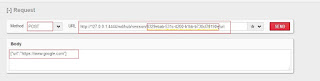
Step 3: Navigate to www.google.com.

Lets go back to
Restclient and put below info ( main part is session-id which we created
earlier)

Click
on send button, then browser will be navigates to www.google.com
Step 4: Find the Text ( google search text box)

Once
you submit your request, look at the response we got Element ID as 0.
I.e
the index of the element which we are trying to access.
Step 5: Key in Text in google search box
API
reference: https://github.com/SeleniumHQ/selenium/wiki/JsonWireProtocol#sessionsessionidelementidvalue

On
Submit, your browser keys in said text.

This
is how we can integrate selenium with each and every language which supports.
You
can use any programming language that can send HTTP requests to automate
Selenium tests on the browser.
Subscribe to:
Posts (Atom)