Showing posts with label eclipse. Show all posts

Thursday, 6 June 2019

Eclipse - Maven - Could not resolve archetype org.apache.maven.archetypes:maven-archetype-quickstart:1.1 from any of the configured repositories.

often you might come across below issue while creating maven project in eclipse.


The solution is very simple.

Just Delete .m2 folder ( C:\users\Kranthi\.m2)

That's all ..

Thursday, 29 June 2017

Run SOAPUI project via gradle command.

1. Create a SOAPUI project and save it as xml file
2. install gradle and set path for the same
3.  install eclipse
4. install gradle add on over eclipse ( via eclipse market place)
5. create a gradle project
6. open build.gradle and paste below code

/*
 * This build file was generated by the Gradle 'init' task.
 *
 * This generated file contains a sample Java Library project to get you started.
 * For more details take a look at the Java Libraries chapter in the Gradle
 * user guide available at https://docs.gradle.org/3.5/userguide/java_library_plugin.html
 */

// Apply the java-library plugin to add support for Java Library
apply plugin: 'java-library'


// In this section you declare where to find the dependencies of your project
repositories {
    // Use jcenter for resolving your dependencies.
    // You can declare any Maven/Ivy/file repository here.
    jcenter()
}


dependencies {
    // This dependency is exported to consumers, that is to say found on their compile classpath.
    api 'org.apache.commons:commons-math3:3.6.1'

    // This dependency is used internally, and not exposed to consumers on their own compile classpath.
    implementation 'com.google.guava:guava:21.0'

    // Use JUnit test framework
    testImplementation 'junit:junit:4.12'
}


public class SoapUITask extends Exec  {
String soapUIExecutable = 'C:/Program Files (x86)/SmartBear/SoapUI-5.3.0/bin/testrunner.bat'
   String soapUIArgs = ''

   public SoapUITask(){
       super()
       this.setExecutable(soapUIExecutable)
   }

   public void setSoapUIArgs(String soapUIArgs) {
       this.args = "$soapUIArgs".trim().split(" ") as List
   }

}


 // execute SOAPUI
task executeSOAPUI(type: SoapUITask){
    soapUIArgs = '"G:/testsoap-soapui-project.xml"'
}


** Replace couple of path in the above code/

open command window @ build.gradle location
>gradle executeSOAPUI


Thats all.

Wednesday, 1 February 2017

Eclipse - Maven - Archetype

Here is the archetype for a new maven project for automation

maven-archetype-quickstart

Thursday, 28 April 2016

Opening / Importing an existing project in Eclipse

Sometimes, we might be get confused, how to open an existing project in Eclipse?

Here we go.

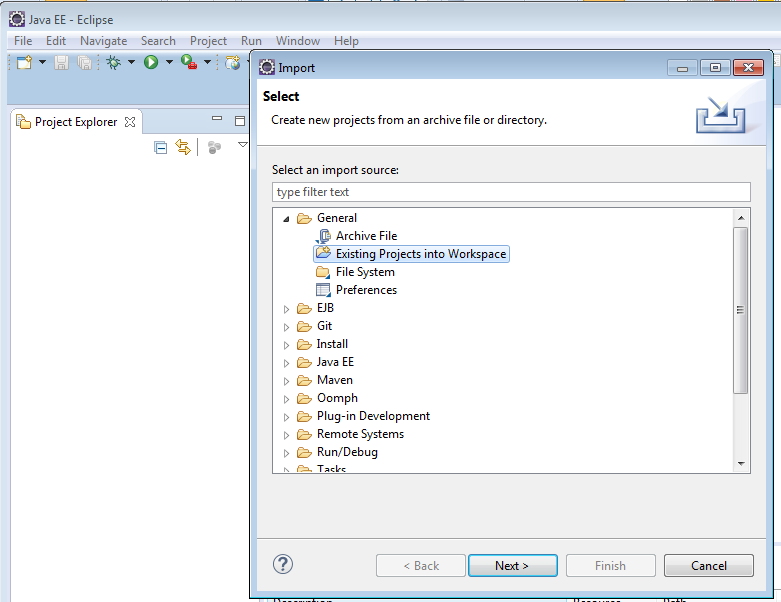
1. Open Eclipse, Navigate to File - > Import


2. Select 'Existing Project into work space' under General category.


If your project is maven project, please select 'Existing maven projects' under maven


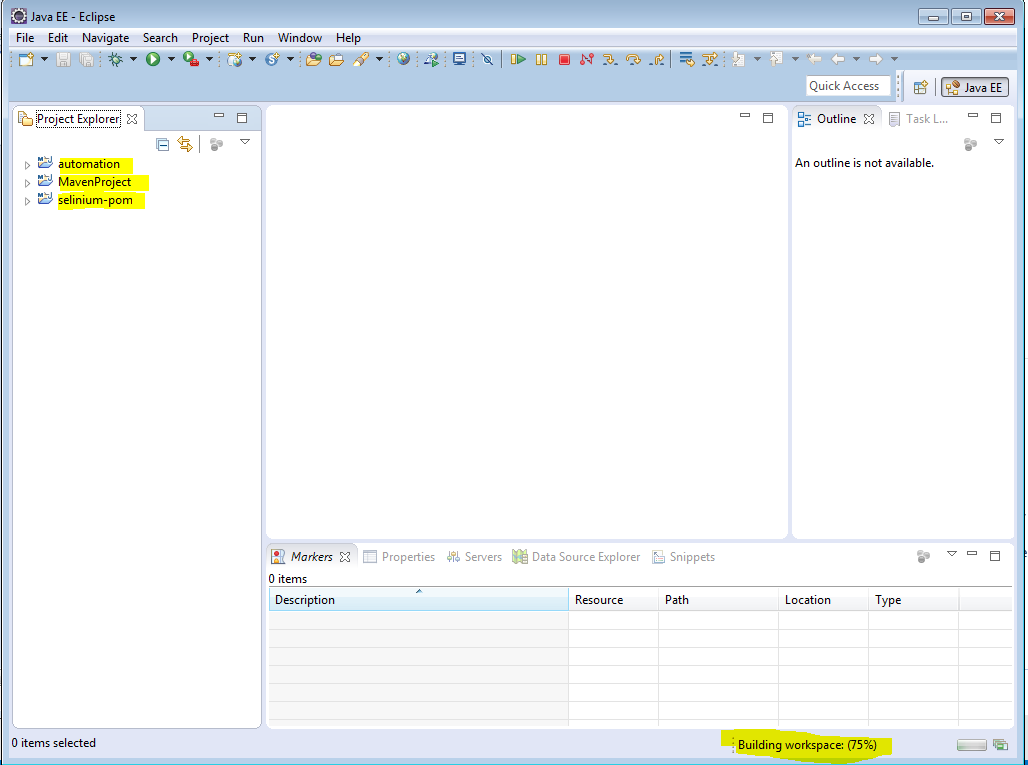
3. Select your toot directory. ( This is Parents Folder of your project )


4. Here is how it looks like.


That's all.

Wednesday, 20 April 2016

How to create Maven project in Eclipse for Java.

 Maven is a very nice build and configuration tool that helps us specify the jar as a GAV (group, artifact, version) in a xml file, that helps manage the project dependencies in a succinct manner.

Steps for creating maven project.

a.       Open Eclipse and got to File -> New -> Other


b.      Search with ‘Maven’ and select Maven Project.

*** If you are not able to locate MavenProject here, please install maven add on in eclipse.
Eclipse - Help - Install new software and link is http://download.eclipse.org/technology/m2e/releases/


c.       Un-check the ‘Use default Workspace location‘ and choose your workspace .


d.      Select the archetype, for now just select the ‘maven-aechetype-quickstart‘.


e.      Specify the Group Id & Artifact Id and click on Finish.


f.        Here is the pom.xml


g.       Right click on the pom.xml and go to Run As > Maven test.


h.      Here are the logs.


Thats all guys.

Download the project from : https://github.com/kasthurikranthikumar/EmptyMavenProject